Hi I'm Hamish. This is a documentation of my wonderful adventures as I make my way from a flailing animation student, to a powerful and successful art ninja (I hope.) I'll be posting my work from Animation College NZ fairly regularly (at least that's the plan) as well as my own personal work. So hold onto your socks or they may get blown off. If you like what you see, good for you. Hopefully there'll be more soon enough.
By the way here's some shameless self advertising. Deviantart Portfolio (basically the same stuff but whatevs) Youtube
Well since the 23rd of may, when I last posted, a lot has happened. Most notably, just over a month has passed without me updating this blog, and also my group and I have finished our short film.
So uh, my bad again. Clearly I'm not very good at this whole regular updating thing. But now there's a lot to put up here so I suppose I should get to it.
At the end of my last post I had just created a rig test, which meant it was time to animate.
First I played around with matching cameras between After effects and Maya. I found methods to export a Maya camera to AE and vice versa, and I found that it was much easier to make the camera move in After Effects and then bring it over to Maya for animating than the other way around. This way I could see the whole scene moving with the camera rather than just the character.
I used an AE script called 'AE3D Export' created by Ryan Gilmore which allows you to select your AE camera and some 3D objects and export them to a maya scene. Then I imported my character and also created an image reference plane showing the moving background so that I could see the character in the scene through the maya camera.
I did this for the 3 shots containing 3D that had complex camera moves. There were two other shots which included the 3D character but had no camera move so I didn't bother with a camera export for those shots.
Once I had all of the Maya scenes ready I went about animating.
This wasn't a particularly difficult piece of animation, though it did take me a little while to wrap my head around the idea of subtle realistic movement. Since Oscar is a real person, not some over the top animated character I wanted to make his animation realistic. I had to figure out what kind of subtle movements he would make even when he wasn't really 'doing anything.' I also had to consider the forces acting on his body, he isn't standing on anything so obviously something is making him float/fly. I decided to treat it as if he was under water, this meant that he was being held up by his chest/torso, and his limbs could just sort of float around on their own. IK was great for this. I was able to move around the model's core control without the feet or hands changing position which made for some fairly convincing movements. I also wanted to consider individual poses, much like you would in 2D. When thinking about movement it is easy to forget about silhouette and pose. I liked the poses in our animatic so I wanted to stay somewhat true to them. So I started with key poses, letting the program in-between them however it wanted.
Then I started tweaking movements. I wanted movements that flowed through his body in an elegant, almost dance-like way. To do this I staggered key frames, for instance I would have a key for the pelvis, and 5 frames later a key for the lower back, 5 frames later one for the rib cage, then the neck, then the head. This way you could see a movement flow up the spine. I used this technique for the arms and legs as well. I also attempted to make use of the 12 animation principles. Mostly I focused on anticipation, follow through, and slow in/slow out.
Of the 5 shots the first two were the most complex. They were close up and demanded more precise animation. The latter 3 were long shots and had fairly simple movements so these were much easier and faster to animate. Then I rendered out the final animation for each shot with the textures.
After animation I moved on to simulation. I had done tests right at the beginning of the year so I generally knew what I was doing. I decided that I should do a two pass effect. One pass of voxel based smoke, and one of simulated particles. I made a 3D container for the smoke and set my character mesh as the emitter. I had a lot of settings to play around with and it took me about 3 days to work out the right look. I used a turbulence field and a wind field to get the smoke moving the way I wanted it to. I turned my settings on the smoke and the fields into presets and then copied them to each other shot.
Next I baked each of the simulations so that they would render faster, and set them up to render. To speed up the process I rendered on about 7 computers at school.
When the renders were done I went to start compositing them I discovered that each shot had something wrong that would require me to re-simulate and re-render all of them. In most shots the smoke was moving too fast, and in others it was moving in an undesirable direction or shape. So I tweaked all of them and re-rendered. In hindsight I should have done more test renders/playblasts before going to the final render in the first place.
Once those renders were done I was ready to do the particle simulations. This process was almost identical to the smoke process. I set up a particle node and set my mesh as an emitter, tweaked settings and fields for a day or two, then baked and simulated. This time I did playblasts along the way. Since I was only simulating about 500 particles at a time is was a lot easier on my machine than the smoke had been, so test renders weren't too difficult. Then I render-farmed again at school and the effect simulation was complete.
Next up was compositing and effects. This ended up being one of the longest processes for me. Compositing can be relatively quick if you're just putting and animation on top of a video or something like that, but I was essentially creating the entire world in compositing using the elements that had been built by myself and the team. I spent a very long time adjusting colours, blend modes, movements, timing, camera moves, effects, and lots and lots of tweaking for every shot. For the character effects alone I used 20 After Effects layers per shot to get the look that I wanted.
Here's a quick video of how that looks in action
I'd say that compositing alone probably took me at least 80 hours of work time, though I should mention I'm pretty terrible at estimating time. In the end I had rendered out between 4 and 8 versions of each shot, that was 54 videos all together not including all the test shots and versions of the whole short film. During this process I even had to do some flash animation for the creeping light effect (though it was pretty janky since I had to rush it to get everything done) because my camera tracking wasn't working for the originally intended 3D effect we had planned on using, and I figured flash would be faster than a rotoscope effect. I should mention that every effect in this short film was done by me. I did the shot smoothing on the live action footage, I did the eye opening effect (Oscar did the 2D animation of it opening, and then I did all the compositing) and the space fly through, all of the effects on the jellyfish, glow effects, particle effects, I made all the space backgrounds using Hubble photos, colour corrections, glitch effects, shaky effects on the creepy shots. All of it. The only effect-like bits I didn't touch were the title and credits, which were done by Oscar. I was meant to do new glitch effects on the credits but I completely ran out of time. So it was a lot of work to complete.
OH! and the phone effects. I did all those too.
I found a free 3D model of the Galaxy S5 phone, edited it a whole bunch to make it not look so janky, textured it and rendered it to match the shots, then I made a phone screen in Photoshop that matched the original screen on the footage, did some animations on it in after effects, composited that all together in the shots and added glow effects to the screen. I'd forgotten all about that hahaha.
Next I took all of those videos over to Premiere Pro to edit together. This didn't take too long. I just had to drag and drop videos over top of our animatic and add the new sound that Oscar had made and I was done.
So here's the final film. :D
In the end I had to hand the project in almost a week late, which I wasn't at all happy about, but It would have been practically impossible to get it in on time with the amount of work I ended up having to do for compositing. In hindsight I could have dealt more of that work out to other members of the team and also managed my own time a little better, but they were all working hard on their portions of this project and on other school work so I was reluctant to give them more. Also I just wasn't used to this amount of work myself. So while I possibly could have worked a little harder to get it in on time, I already felt fairly overworked and pushing myself harder didn't entirely feel like an option. In any case it got done and I think on the whole it looks really cool, though there are still things I'd like to fix up at some point.
So that's it. A semester of work surmised in a single one and a half minute video. Cool beans.
It's been over nine weeks since my last cinematic post.
My bad.
I don't really know how this happened.
oops
That said I have been working rather studiously, so studiously that I haven't really even been able to think about posting. I suppose we'll see whether or not I actually manage to cover all of that work in this post.
But I can try, so here goes.
Back when I last posted I showed off what I was doing with 3D, which looking back was just so ridiculously long ago. I got a tutorial from the main man Jerwin for human body modeling, and a couple days later I had this.
It was cool having a tutorial that showed me some good topology techniques for human anatomy and it was designed to deform well in animation. I also learned how to make better use of some tools that I hadn't really done much with before.
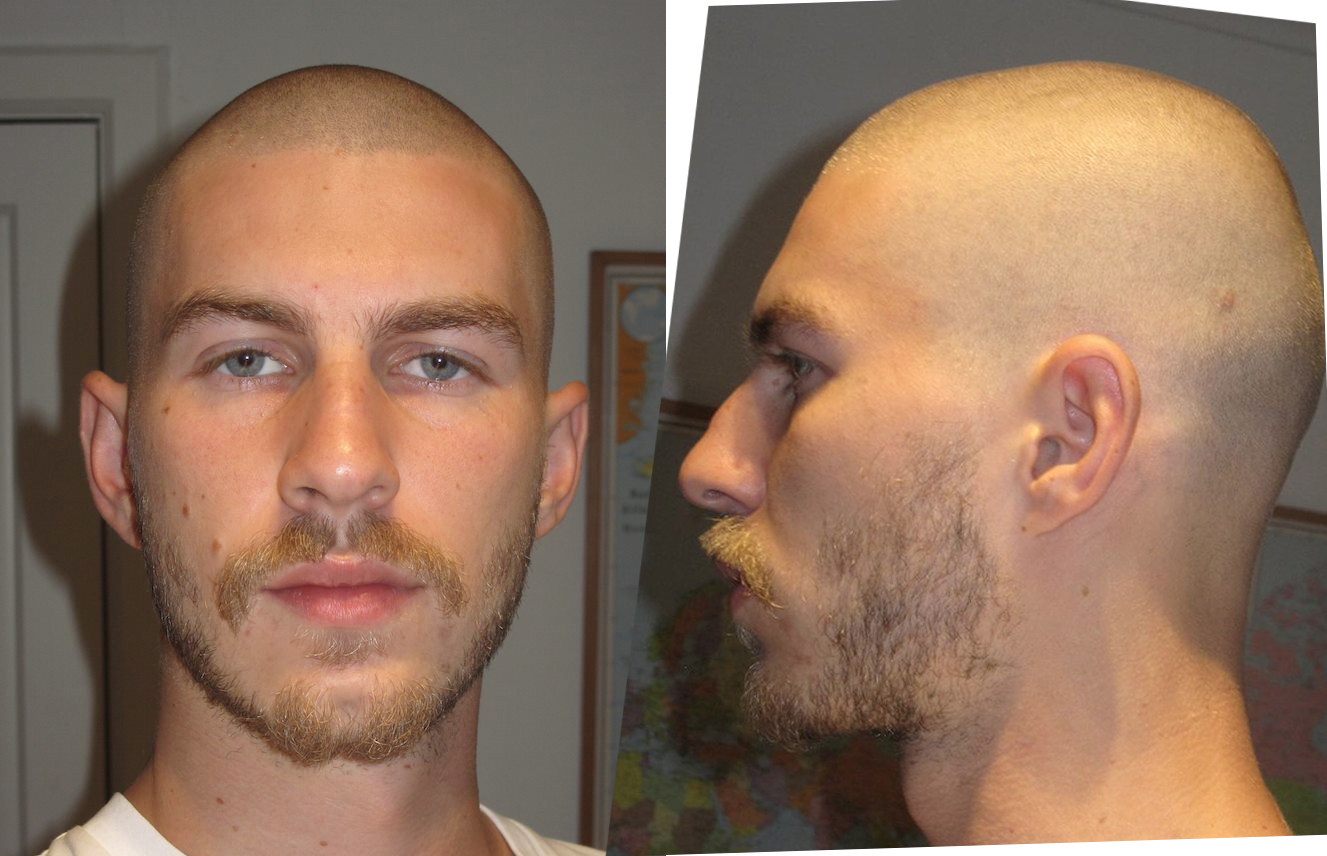
The next step was modeling Oscar's head. Originally we planned to cover up the 3D model with the particle and smoke simulations, but after the sim tests that I did (see the last post) I realised that the model would probably be pretty visible, so I decided it would be best to try to make the model actually look like Oscar. To do this I asked him for a couple photos of his face to put into Maya, and this is what he gave me.
The photos were taken at arms length and I knew this would warp the proportions of his face a bit but I figured it wouldn't be too bad. I grabbed a tutorial from Pluralsight for modeling the human head and went to work. Once again a couple days later I had this.
The topology was nice, again it was good to have that tutorial showing good topology for animation. But as I mentioned earlier the head was pretty warped. I tried to correct things a little but the forhead was too broad and the lips were too big and it was all just kinda wrong which I knew I'd have to fix eventually.
While I was doing all of this we finished our storyboard, or the first version of it anyway, and that meant it was my turn to take that and turn it into an animatic.
Here's what I had to work with, given to me by Tea.
Then Oscar provided a sound file and I was also told that the glow on the character should be gold, not blue. So here's what I made.
Which everyone was happy with at the time. We knew that the spirit world was too vague, but that was okay for the time being, we'd figure it out eventually.
Since the animatic was done it was time to film. We all headed round to Oscar's place with my camera, set up in his Dad's room and started filming. I acted as camera man with Oscar as the actor and Tea, Jo, and Adrian helping set up lighting and figure out shots. I put my camera on a kitchen tray for a little stabilization. We checked out the footage and realised that my camera wasn't getting the results we wanted, so Oscar biked in to school, got one of their cameras, biked back and we started shooting again. This time the footage looked awesome so we wrapped up. Here are some photos ( mostly from Tea's blog) of the wonderful event.
Good times with the crew.
After our first break we realised that we really needed to sort out the spirit world shots so Tea worked on some new storyboards and I started some new animatic. I used the backgrounds and large creature that Adrian was working on and the smaller creature that Jo was working on, and I went from there. I had to paint a few assets in photoshop, just the Oscar spirit and the low angle shot of the tree, and then I put it all into after effects and made the camera moves and compositing and effects, etc.
It still didn't really have an ending but it was getting closer. We had a group progress report and were told that we needed to sort out the spirit world better so we all sat down and discussed it, I sketched the ideas into a quick storyboard
which Tea took away and started to refine into this
Which looked waaaay better. Sooo, once again I was tasked with updating the animatic.
Here's the first version, still missing most of the end.
And then Keat helped us think of a couple other possible shot compositions to make things more interesting. I jumped into photoshop and did some new elements for the animatic like this here.
I also blocked out some rough movement for the creature etc etc, and created this.
It was getting a lot close to the sort of thing we were aiming for but not quite. Tea came up with a couple other shot ideas and I put in all of our footage, then we had this.
Which was almost there! The team was pretty happy with it, even Dane liked it, but Keat wanted it to go further, so since at this point I'd gone multiple nights without sleep and still had a tonne of 3D to do, Keat split up the shots between Jo, Tea, and Adrian to polish up and put into the animatic while moved on, and here's what the came up with. (you'll have to forgive the echoing sound, I didn't composite this one but I think two versions were overlaid and they forgot to mute one)
I have to say it hurts a little to see weeks of work largely overwritten, but I think the layout looks better for it. In the end we managed to come up with the shot compositions as a team and shared the work around more and I think it's cool that all of our voices and styles are coming across in the film.
So after all of that it was back into 3D for me. There was still a lot to do.
The face was still warped and I decided the first thing to do was fix it, so at school Oscar and I grabbed a camera and tripod and took some nicer reference photos.
We took those from about five meters away with a zoom lens to minimise the warping and made sure that the camera stayed stationary to keep the same angle. These ended up being perfect. I loaded them into the same Maya project and adjusted it all and I managed to get it looking like this.
And if I dare say so myself, looks quite a bit like Oscar, but it gets even eerier when you add hair and a stache.
Those are just extra objects I made to stand in until I got some actual hair sim going.
Next I did a quick UV map using the automatic mapping option in maya and cleaned up a couple areas (id din't have to be nice since my textures are all proceedurally generated in Maya) and applied the texture from my sim tests. I also checked out some hair simulation tutorials and replaced the hair objects with actual maya hair. Then I did a turntable, so lets check that out shall we?
Again it's kinda eerie. I still need to make his beard but I'll get round to that eventually.
Next it was time to rig the thing. Otherwise known as hell.
I had yet more tutorials to check out for this. One for basic rigging and skinning, the other for muscles.
First I made a basic bone setup.
Then I had to make some weight paint it.
Then I tried moving it, but I found that even though the deformations were smooth, there was some collapsing around the shoulders and legs.
So I decided to try my hand at a muscle rig. My freaking mistake. I Found a muscle tutorial and set about it. I did a quick test to figure out how muscle worked.
And I was like yeh I get it. ONWARDS TO GLORY!!
It took a few tries, and about a week, and honestly I can't be bothered looking through it all for progress pictures, but here's what I ended up with.
Which looks cool right? I turned all of my joints into muscle bones, built rib and pelvis deformers from nurbs objects, had to rewight the bones to the skin (there's a tool to do it automatically but it didn't work for me, the first sign of the horrible events to follow.) then built the muscles, sculpted their squash and stretch poses, mirrored those poses maually, and checked that they all moved the way I waqnted them to. It all looked like it was going so well, but when I went to bind the muscles to the skin...
Apparently I did some stuff wrong, and got shoulders McGee. When I add the muscles it assume that they already have a pose and then I paint the weight and hell breaks loose. Too bad so sad. And thus I abandoned the muscle rig after many failures and many sleepless nights spent working and crying. And so life goes.
So I went back to my original muscleless rig. I figued if I was subtle enough with my animation then there wouldn't be any collapsing. I just can't lift the arms or legs too high. Otherwise the deformations are all acceptable. It's just too bad that I won't be quite so free when I animate.
Then I built the controls, that didn't take too long, just some nurbs curves and constraints.
Blammo. Then I did the rig test.
It's a bit short but I think the movement matches the kind of thing that'll be in the final film so I'm happy that the rig should be sufficient.
So that's pretty much everything. There's probably a bunch of little bits and pieces that I did to figure this stuff out, various scribblings in books and such. All the stuff that would be on here if I just updated as often as I'm meant to. As I said I've just been working too hard to even think about blogging. It's been intense. Next up, blocking out the actual shots in 3D and then animating. Then I can get to simulation and rendering. Should be very interesting indeed.
I'll try be at least a bit more onto it with these blogs, so hopefully I'll be back soon with more.
Untill then, stay healthy, and sleep more than I do.
Very long time no post.
My bad, I'm terrible at keeping up with these things.
That said I haven't stopped working!
So here goes with a nice big update on what I've been up to.
First up is trying to simulate the spirt. In our film as mentioned in other posts, we have a golden spirit coming out of our main character. We discussed this being done using 3D particle simulations and as head of 3D it's my job to figure out how to do that.
I did a quick photoshop concept of the effect I wanted to achieve.
I showed this to the team and they liked the look, so I set out to figure out how to do it!
I grabbed up as many simulation tutorials as I could find and in the end I found a couple of tutorial sets by Digital Tutors that were super helpful. One was all about simulating smoke like effects using a voxel based system called Fluid Containers. The second was a particle simulator that runs off the ndynamics system in Maya.
The way I decided to create the effect was by using one or both of these effects emmiting from a 3D model of Oscar to make an etherial looking spirit simulation.
I started with the fluid containers tutorial set. I played around with this for a while trying to get the look I wanted. I managed to get the smoke effects emmiting from an object and being affected by gravity.
I found that to get nice smoke detail I needed to crank up the voxel count quite high which slowed down my computer quite a lot. The simulation time as well as the render time were enormous. I've since then found out that I can save out a simulation prior to rendering which speeds up the render by a tonne so that'll be helpful for future tests.
I quickly tried playing with some different colours of smoke as well.
I thought the effect looked nice but it could be taken further, though anything more complex will take a lot of time to simulate and render.
I realised that I would be able to cut down on simulation time if the emitter object wasn't full of voxels/particles. What I mean is that since my object was completely invisible I had to have a lot of voxels/particles covering its surface so that you could make out its shape. If I instead made the object visible I could have less simulation going on on the object's surface.
And so I created this.
After a lot of playing around in hypershade I managed to create a dynamic texture that looks like particles. I built the texture with multiple ramps connected to multipliers and a 3D noise texture so that as the object moves through it, cloudy particles seem to move along its surface.
I really liked that so I started playing with simulating particles flowing off of the sphere.
This time I used ndynamics. I watched another bunch of tutorials and eventually started to get the hang of it. I ended up simulating at a rate of 15,000 particles per second, which came out to about 80,000 particles simulated all together.
I was pretty happy with the result. Of course I didn't get this straight away, there was a lot of playing around and adjusting. In this simulation I added a turbulence field to give the particles more life. The blending between the texture and the particles came out really nice as well.
For reference, this is the look I was aiming for. It's not quite the same, but to render that many particles would have been impractical for me so what I have is good enough for now.
I showed the team what I had and they were pretty happy with how it's coming along. I have a bunch of stuff to try out with the next set of simulations. I want to add more size variation in the particles, I also want to play more with fields and try constraining particles to vector paths. But the main thing I want to try is compositing the smoke effect together with the particle effect to get more depth and variety.
So that's it for simulation for now, next up I did a little concepting!
I wasn't really on concepting on the schedule, but I felt inspired to do some environments.
I started by trying to do some matte paintings on top of existing environment photos.
I thought they came out kind of muddy and it was hard to see the composition in them so I decided to break up the planes into colours.
I preferred the composition of the second one so I started to develop it further.
I removed the water so that all of the islands were floating in the sky. I really liked that composition so I decided to start to render it.
This one was just to get some atmospheric perspective. Then I added colour and started painting on the layers.
That's as far as I got with it but I liked the vibes I was getting. I was never really intending to use the concept since I wasn't rostered on concepting, but I showed it to the team anyway and it sparked up some good conversation about colour scheme and how the background should look etc. so I think it was worth it in the end.
Next on the list was the animatic. Oscar did the sound for that so I had to take that and match up the visuals as well as add a few extra little sounds to add effect.
I started by taking Tea's storyboard and cutting it into layers using Photoshop. I then imported those layers into After effects where I made a composition for each shot and dynamically linked them to Premiere Pro for the final editing. I also dynamically linked Oscar's Audition file so that I could edit the audio timing in audition. It too a decent bit of time to put it all together and add effects but I got it there in the end, so here it is.
I think that's generally what we're going for. The timing may change a bit and we may add in another shot or two. Exactly how the spirit world is going to work is still a little vague, but I worked with what I was given.
And lastly 3D. To be honest I haven't gotten super far with it. With all the simulation stuff and everything else modelling has taken a back seat for now. But I have some tutorials for making an organised human mesh and it's not the first human model I've made so I'm hoping it won't take too long. So far I have the symmetrical reference photos put together and my first basic shape has been laid down.
Hopefully Oscar doesn't mind me showing off his awesome body on here. You can see it's super early stages right now. The next step is probably a 5-10 hour modelling session to get it mostly done. Then I can move on to more simulation tests and other interesting stuff.
So All up I have a descent basis to work off for the rest of the semester as far as knowing what I need to do to get the effects that I want.